
What Can an AI Agent Do for Me? (Practical Guide for 2026)
What can an AI agent actually do for you? Not the abstract version — the practical one. Which tasks can you hand off today, and which ones still need a human?
This guide answers that directly. It covers the six core capability categories, what each requires to work, and how to figure out which tasks are worth delegating first.

The short answer
An AI agent can research and summarize information, browse the web, write and send emails, make purchases, generate images, run code, monitor websites for changes, and manage files — all without you approving each step. The set of tasks it handles depends on what tools you give it access to.
That’s the 40-word version. Everything below is the detail behind it.
The six core capability categories
An AI agent's capabilities are determined by the tools connected to it, not by the model powering it. The model provides reasoning — the ability to plan, adapt, and interpret results. The tools provide action — the ability to search the web, send email, execute code, make purchases, and generate content. Without the right tools, even the most capable model can only describe what it would do rather than doing it. Capability is infrastructure, not intelligence.
Most of what agents do today falls into six buckets. If a task fits one of these, an agent can almost certainly handle it. If it doesn’t, the agent is probably not the right tool yet.
| Capability | What it means | Real example |
|---|---|---|
| Research | Search, read, synthesize | ”Summarize the last 30 days of competitor product updates” |
| Communication | Send, receive, and reply to email | ”Draft and send follow-up emails to everyone who requested a demo this week” |
| Commerce | Find, compare, and purchase | ”Order the cheapest same-day ink cartridge under $30” |
| Code & automation | Write, run, and fix code | ”Generate a sales summary from this CSV and email it to me every Monday” |
| Monitoring | Watch for changes, trigger alerts | ”Tell me when a competitor changes their pricing page” |
| Generation | Create images, audio, documents | ”Generate product thumbnails for the 12 new SKUs in this spreadsheet” |
These are not hypothetical. Each one runs on infrastructure that exists today. The question isn’t whether agents can do these things — it’s whether the one you’re using has the tools connected.
Research: the category agents win most consistently
Research is where agents are furthest ahead of manual work. Give an agent a research task — summarize these 50 articles, track mentions of our brand across five forums this week, compare the API pricing of six providers — and it will run faster and more thoroughly than a human doing the same work.
Specific things agents do well in the research category:
- Competitive monitoring — scan competitor sites, release notes, and press coverage on a schedule and surface only what changed
- Document summarization — read PDFs, reports, or long threads and return structured summaries with the key points extracted
- Multi-source synthesis — search across several sources, reconcile conflicting claims, and produce a single structured output
- Due diligence — research a person, company, or market before a meeting or decision, pulling from LinkedIn, Crunchbase, news, and public filings
According to IDC, the AI agent market is growing at 46.3% annually — driven in significant part by enterprise adoption of research automation. Gartner projects enterprise app adoption of agentic AI going from under 5% in 2025 to 40% by 2026, one of the steepest adoption curves on record for any enterprise technology.
Communication: agents with email addresses, not just email access
There’s an important distinction here that matters in practice.
Most agent frameworks can send email from your inbox — they have access to your Gmail or Outlook account. That works for outbound tasks like “send this message on my behalf.” But many real workflows require an agent that can also receive email: confirmation links, booking replies, two-factor codes, and transactional notifications all come back as inbound email.
An agent with its own dedicated email address — separate from yours — can handle the full loop:
- Receive a booking confirmation and add the details to your calendar
- Handle a verification link that arrives after signing up for a service
- Reply to routine incoming inquiries using a template you’ve defined
- Receive receipts and compile them into a weekly expense summary
ATXP provisions every agent with an @atxp.email address alongside its identity account. That makes the difference between an agent that can draft emails in your drafts folder and one that can actually participate in email-driven workflows end to end.
Commerce: buying things is harder than it looks
Commerce is the capability category with the most distance between the demo and the reality.
Yes, an agent can find a product, compare prices across five retailers, and select the best match against your constraints. That part works well. The bottleneck is payment: what happens when it’s time to actually complete the purchase?
"Shopping cart filler — turning around at checkout: 'here human, time for you to give them the card.' At some point, merchants will shake hands with an agent in a trusted way. We're building toward that."
 Louis Amira — Co-founder, ATXP
Traditional payment infrastructure wasn’t built for autonomous agents. Credit cards require human billing addresses and human-initiated transactions. Subscriptions require sign-up flows a human completes. API keys expire and get rate-limited.
The fix is a pre-funded payment account the agent controls — not your card, not your subscription, but its own balance it can spend within limits you set. That’s the model ATXP uses: every agent account comes with a payment balance. You fund it; the agent spends from it per tool call, per purchase, or per task. You can see every transaction. You set the caps. The agent never needs to ask you for the card.
With that infrastructure in place, commerce tasks that previously required human intervention at checkout work without it.
Code and automation: write it once, run it forever
Coding agents have the most mature track record of any agent category. The feedback loop is clear (code passes tests or it doesn’t), the environment is controllable, and the output is objectively verifiable in a way most other tasks aren’t.
What agents handle well:
- One-off scripts — “Write a Python script that reads this spreadsheet and sends me a formatted summary every Monday morning”
- Bug triage — read an error message, trace it to the source, write and test a fix, open a pull request
- Data transformation — convert data from one format to another, apply a logic rule, export a cleaned version
- Report generation — pull data from an API or database, format it, and deliver it to an email or Slack channel on a schedule
- Integration glue — connect two services that don’t have a native integration by writing a small script that runs on a cron
GitHub Copilot has 20 million users as of mid-2025 — including 90% of Fortune 100 companies — almost entirely because code is the task category where AI assistance most directly translates into measurable output. The coding agent category is a leading indicator of where the rest of agentic AI is heading.
Monitoring: agents that watch so you don’t have to
Monitoring is one of the most underused agent use cases because it doesn’t feel dramatic — but it’s where agents create disproportionate value.
The pattern: tell the agent what to watch, what counts as a change worth surfacing, and how to alert you. Then forget about it.
- Competitor monitoring — track pricing pages, feature announcements, or job postings at competitor companies and alert you when something changes
- Price tracking — watch a product across multiple retailers and notify you when it drops below a threshold
- Uptime and availability — check whether a service or page is up on a schedule and page you if it goes down
- Mention tracking — monitor forums, social, or news for mentions of a keyword and surface only the ones matching criteria you define
- Regulatory and compliance — watch a regulator’s page for new guidance or rule changes in a specific area
The reason monitoring matters as an agent use case is that it’s genuinely zero-marginal-effort once configured. A human doing competitive monitoring has to remember to do it. An agent doesn’t.
Generation: images, documents, and structured content at scale
Image generation and document creation are often treated as consumer features, but they’re increasingly practical for business workflows at volume.
- Product images — generate thumbnails, lifestyle images, or diagram variations for a product catalog at scale
- Document drafts — take a data file and produce a formatted first draft of a report, proposal, or brief
- Marketing assets — create social images, ad variations, or email banners from a brief
- Audio and video — generate narrated explainers, voiceovers, or short-form video content from a script
The value is highest when the task is repetitive and the variation is programmatic (12 SKUs, each needs a product thumbnail in the same style). One-off creative work requiring deep personal taste is still better done with a human in the loop.
What the agent needs to actually do each of these things
There’s a common disconnect in agent demos: the agent explains how to buy something instead of buying it. It drafts an email instead of sending it. This happens when the agent has reasoning capability but is missing the tool.
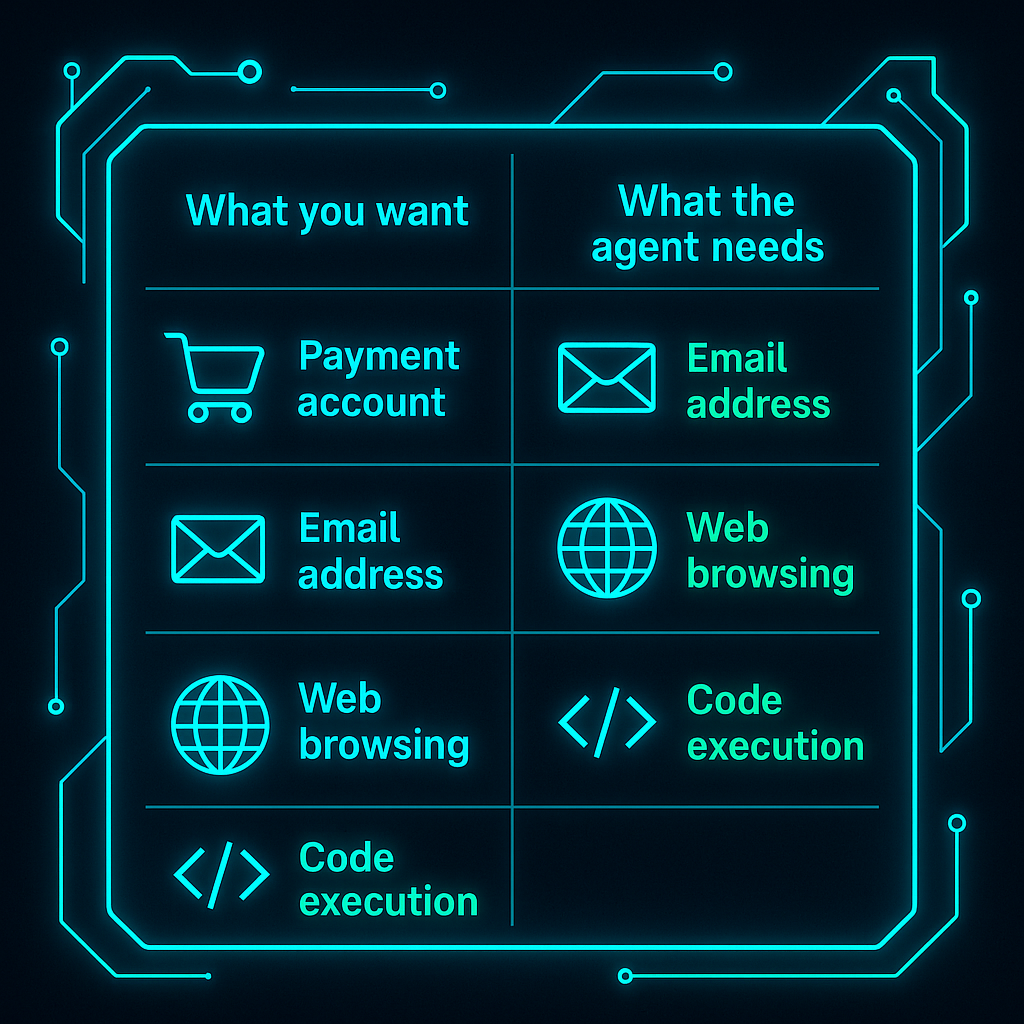
| If you want the agent to… | It needs… |
|---|---|
| Make purchases | A pre-funded payment account |
| Send and receive email | A dedicated email address + email tool |
| Browse the web | A web browsing tool |
| Run code | A sandboxed code execution environment |
| Generate images | An image generation tool |
| Search the web | A web search tool |
| Call an external API | API credentials and an HTTP request tool |
This is why “just use GPT-4” doesn’t work for many of these tasks. The model is the reasoning layer; the tools are what it acts with. Neither is sufficient alone.
ATXP bundles all of this — identity, payment account, email address, and 14+ tools — into a single account that attaches to whichever agent or framework you’re already running.
Add all of it to your agent in one command.
npx atxpYour agent gets a handle, a pre-funded payment account, an @atxp.email address, and access to tools including web search, web browsing, code execution, image generation, file management, and more. 10 free IOU tokens on signup. Pay per tool call only.
What agents don’t do well yet
This list is shrinking. But honesty is more useful than hype.
Anything requiring physical presence. An agent can book the restaurant, but it can’t eat the food or pick up the package.
High-stakes judgment with thin information. Agents are good at making decisions within well-defined criteria. They’re not good at the kind of judgment calls that require reading a room, weighing relationships, or applying hard-won intuition.
Truly open-ended creative work. An agent can generate ten email subject line variations in five seconds. It can’t replace a copywriter who understands your brand voice well enough to make a decision you couldn’t have specified in advance.
Authentication walls. CAPTCHA, ID verification, and some two-factor flows are designed to block non-human actors. Agents hit these and stop. The workaround is usually pre-authenticating once manually and giving the agent a session that persists — but it’s a friction point.
Tasks with ambiguous success criteria. The more precisely you define what “done” looks like, the better an agent performs. “Make the website better” gives an agent nothing to work with. “Improve the homepage conversion rate by reducing the word count in the hero section by 30%” gives it something it can execute and verify.
How to figure out what to hand off first
The hardest part isn’t the technology. It’s identifying which of your tasks is the right first one to delegate.
"My first question is always: 'What's the first thing you'd hand off to it?' If there's silence, I try: 'If you had one of mine right now, what would it be attacking first?' Still nothing? 'If I could freeze time on a Friday afternoon and give you ten free hours — what would you spend them on?'"
Louis Amira — Co-founder, ATXP
A practical filter for identifying good first tasks:
- Repetitive — you do this on a schedule or whenever a specific condition occurs
- Well-defined — you could write the steps in a numbered list
- Reversible — if the agent gets it wrong, you can undo it or catch it before it matters
- Currently annoying — the tasks you’ve been meaning to automate for months
Research tasks (competitor monitoring, document summarization, data pulls) consistently make the best first delegation. They’re high-volume, low-risk, and produce verifiable output. Once you see those running reliably, the next tier — email triage, report generation, light purchasing — becomes straightforward.
How to get started
No setup required: Go to atxp.chat. It’s a chat interface with an agent already connected to web search, web browsing, code execution, and image generation. No account needed to start.
If you’re building or already running an agent: One command adds ATXP’s full tool suite to your existing setup:
npx atxpThis gives your agent a persistent identity, a pre-funded payment account, a dedicated email address, and access to 14+ tools. Works with Claude Code, LangChain, CrewAI, AutoGen, and the OpenAI Agents SDK. See how it connects →
If you want to understand the full picture of what agents need to function in the real world, what an AI agent is covers the architecture. If you’re wondering about trust and safety, whether AI agents are safe works through that directly.
Frequently asked questions
What can an AI agent do for me?
An AI agent can research and summarize information, browse the web, write and send emails, make purchases, generate images, run code, monitor websites for changes, and manage files — all without you approving each step. What it can handle depends on what tools it has access to.
What tasks are AI agents best at?
Research, monitoring, and code automation are the most reliable categories. Competitive monitoring, document summarization, scheduled data pulls, and multi-step web research are all tasks where agents consistently outperform manual work. Communication and commerce tasks work well too, but require the right infrastructure (a dedicated email address, a pre-funded payment account).
Can an AI agent shop and make purchases for me?
Yes, with the right infrastructure. The piece most demo agents skip is payment: what happens at checkout. An agent with a pre-funded payment account (ATXP’s IOU model) can complete purchases end-to-end — finding products, comparing options, and buying — within spending limits you define. How pay-per-use agent commerce works →
Can an AI agent send emails for me?
Yes. Agents with email access can send, receive, and reply to emails — including handling verification links, confirmations, and routine correspondence. An agent with a dedicated email address can participate in full email-driven workflows, not just send from your inbox.
What can’t an AI agent do yet?
Agents struggle with tasks requiring physical presence, high-stakes judgment calls that need personal context, truly open-ended creative work, authentication walls (CAPTCHA, ID verification), and tasks with genuinely ambiguous success criteria. The more precisely you define “done,” the better the agent performs.
Do I need to be technical to use an AI agent?
No. Consumer tools like atxp.chat require no setup. If you want to connect an agent to your own systems or build custom workflows, basic technical familiarity helps — but the infrastructure (identity, payments, tools) is handled for you.